When your systems finally talk to each other
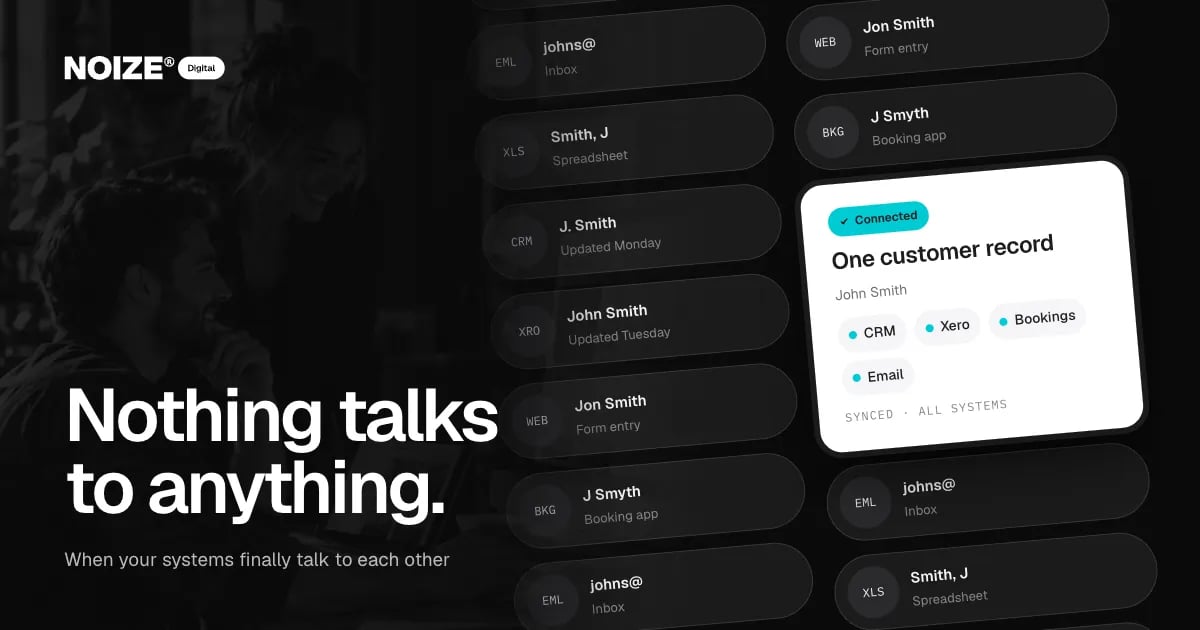
The same customer appears as J. Smith in the CRM, John Smith in Xero, Jon Smith in the website form, J Smyth in the booking app and "Smith, J" in a spreadsheet someone keeps on their desktop. Each system is correct in its own way. None of them agree.
That is what happens when business software grows one tool at a time. Each tool solves a problem. Together they create a new one: information lives in pieces, the team spends hours reconciling it and nobody has the full picture of any customer.
The short version
- Disconnected systems create double handling, conflicting data, slow service and unreliable reports.
- Integration gives each customer one record, entered once and visible everywhere, with the website, CRM, accounting, bookings and email working together.
- Start with the process, decide where each type of data lives, then connect the most painful steps first.
The short version
System integration connects the tools a business uses so each customer has one record, entered once and visible everywhere. CRM, accounting, website, bookings and email work as one. The benefits are faster service, fewer errors, reliable reporting and hours saved every week. Integration works best when it is planned around how the business operates, not around the software. NOIZE Digital scopes and builds it that way.
The cost of disconnected systems
01Double handling
Every piece of information gets entered more than once. Each entry takes time and introduces errors.
02Conflicting data
When systems disagree, nobody trusts any of them. Staff check two or three places before answering a simple question.
03Slow service
A customer calls and the team has to search several systems to see their history, open quotes and invoices.
04Unreliable reporting
Monthly reports require exporting, cleaning and merging data. By the time they are ready, they are out of date.
05Spreadsheet glue
Someone builds a spreadsheet to hold it all together. It becomes critical, fragile and understood by one person.
> I've invested in businesses where the most valuable asset turned out to be clean customer data, and the biggest risk was that it lived in five places. Integration isn't glamorous, but it is the difference between a business that knows its customers and one that guesses.
What integration looks like
- One customer record. The CRM becomes the central record. Other systems read from and write to it.
- Website to CRM. Forms, bookings and orders create or update customer records automatically.
- CRM to accounting. Accepted quotes and completed jobs create invoices. Payments update the customer's status.
- Bookings and calendars. Appointments sync with staff calendars and customer records.
- Email and messaging. Communication history is logged against the customer.
- Reporting. Dashboards draw from connected systems, so numbers update themselves.
Planning it properly
Start with the process, not the software. Map how an enquiry becomes a customer, a job and an invoice. Identify where information is re-entered or lost. Decide which system holds the master record for each type of data. Then connect the tools, starting with the steps that cause the most pain.
Sometimes the answer is to replace a tool rather than connect it. If a system can't integrate or no longer fits, it may be cheaper to move to one that does.
“Couldn't recommend these guys enough.”
An illustrative example
Picture a clinic using a booking app, a separate CRM for marketing, Xero for invoicing and spreadsheets for reporting. Patients appear in three places with slightly different details. Integrating them creates one patient record: bookings sync to the CRM, invoices flow to Xero, marketing lists stay current and reports update automatically. Reception spends less time searching and more time with patients.
Where Digital fits
NOIZE Digital handles CRM implementation, integrations and automation. Sales designs the pipeline the CRM should support. Books benefits from clean data in Xero. IT manages access and security across connected systems. See digital.noize.com.au.
Where to start this week
Pick one recent customer and find every place they appear across your systems. Note the differences in how they are recorded and how many places you had to look. That exercise shows the cost of disconnection more clearly than any proposal.
Choosing the master record
The key decision in any integration is which system owns each type of information. Customer details usually live in the CRM. Financial records live in the accounting software. Bookings live in the booking system. Other systems read from those sources rather than keeping their own copies. Getting this right prevents the duplicate and conflicting records that cause most of the pain.
Clean data first
Connecting systems full of duplicates spreads the mess further. Before integrating, clean the data: merge duplicate customers, standardise formats and archive what is no longer needed. It is unglamorous work, and it makes everything that follows more reliable.
What changes for the team
When systems are connected, the team stops being the glue. Reception sees a customer's full history in one place. Sales sees invoices and payments without asking accounts. Accounts sees jobs as soon as they are complete. Managers get reports that update themselves. The hours saved are real, but the bigger change is confidence: everyone trusts the numbers in front of them.
Questions to ask before you start
Ask how many systems hold customer information. Ask which one should be the master record. Ask where staff re-enter data. Ask which reports take longest to produce. Ask which tools can't connect to anything. The answers map the integration plan.
Related reading
- What a business website should actually do
- The hours your team re-types every day: automation for small business
Common questions
What is system integration?
Connecting business software so data moves between tools automatically and each customer has one consistent record.
Which systems can be integrated?
Common examples include websites, CRMs, Xero, booking tools, email platforms and ecommerce systems.
Do I need to replace my software?
Not always. Many tools can be connected. Where a tool can't integrate or no longer fits, replacing it may be better value.
How long does integration take?
It depends on the number of systems and complexity. We scope it in stages, starting with the most valuable connections.
Who looks after integrations once they are built?
NOIZE IT and Digital can monitor and maintain them.
Do we need to clean our data before integrating?
Usually, yes. Merging duplicates and standardising records first makes the integration far more reliable.
Which CRM should we use?
The right CRM depends on your sales process, team size and existing tools. We recommend based on how the business works rather than a single preferred product.
Will integration disrupt the business?
Integrations are planned and tested before going live, usually in stages, to keep disruption low.
Can integrations improve reporting?
Yes. When systems share data, dashboards can update automatically instead of being assembled by hand.
Can integration work with older software?
Sometimes. Older tools may have limited connections, which can be a sign it is time to replace them.
How do we know the integration is working?
Monitoring and simple checks, such as comparing records between systems, confirm data is flowing correctly.
Your first strategy conversation is on us.
Have a chatThe brand for business.